


Meta Quest – 2 Year "Protected" Bundle
By Knoxlabs
A Meta Quest headset with a Knoxlabs two-year accidental protection package and carrying case. Current package eligibility and protection terms are confirmed by quote.
From
Original price$ 520.00
Current price$ 599.99
Save $ -79.99
Pricing on request
Option: Meta Quest 3S 128GB
Accessory packs
Estimated dispatch: 5–10 days
$ 99.99
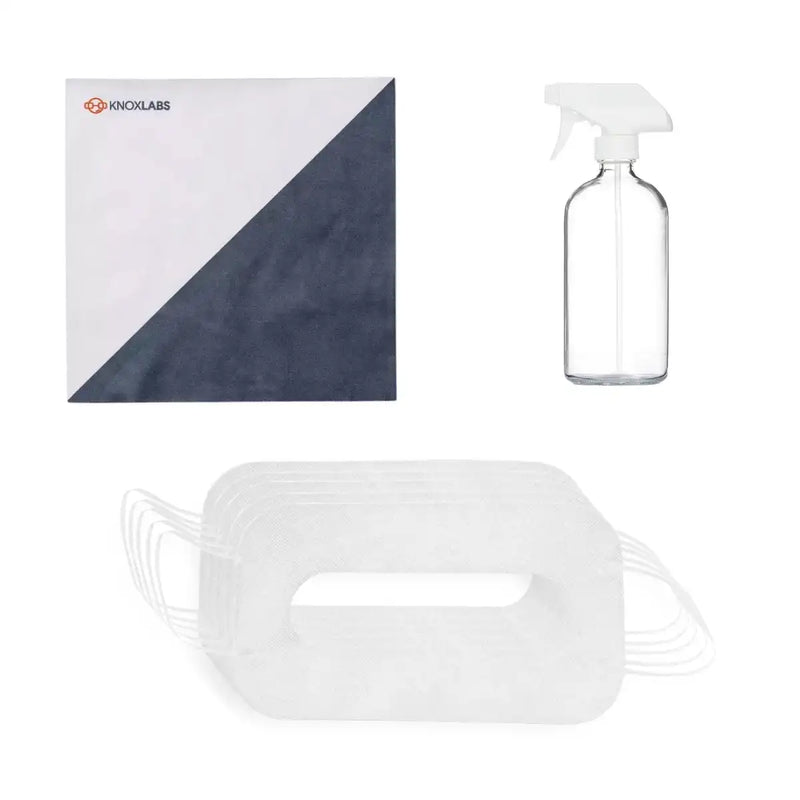
(1x Microfiber Cloth, 1x Lens Cleaning Spray, 50x Disposable Masks)
Quest 3 Comfort Accessories Pack - Meta Official
Estimated dispatch: 5–10 days
$ 209.99
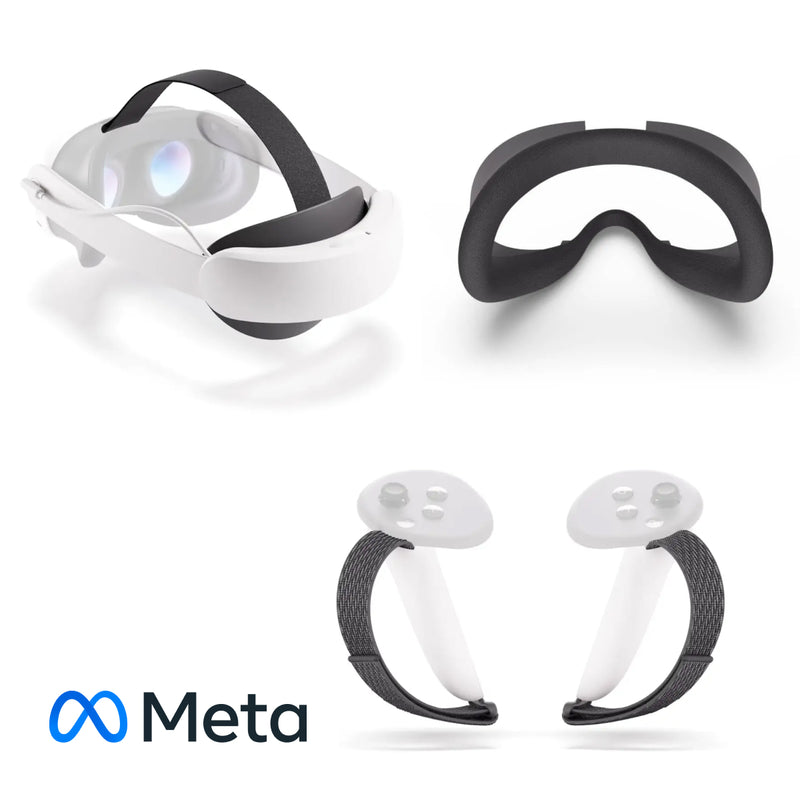
(1x Headstrap w/ Battery, 1x Facial Interaface, 1x Controller Straps)
Quest 3S Comfort Accessories Pack - Meta Official
Estimated dispatch: 5–10 days
$ 209.99
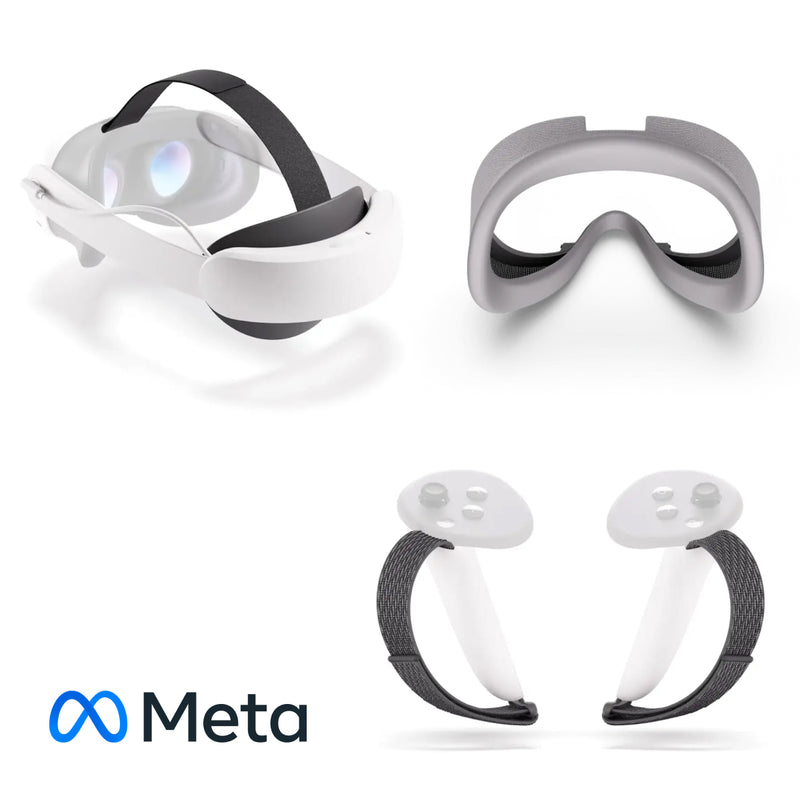
(1x Headstrap w/ Battery, 1x Facial Interaface, 1x Controller Straps)
Device management — business
ManageXR Management Software for Business | 1 Year License
Essential
Digital delivery timing confirmed separately
$ 86.86
ManageXR Management Software – 1 Year License
Enterprise XR Device Management & Content Control Platform
ManageXR is a professional-grade XR device management (MDM) platform built for organizations deploying VR and AR headsets at scale. This 1-year license provides centralized control, secure content deployment, and full fleet visibility across enterprise XR environments.
Designed for Meta Quest, PICO, HTC VIVE, and other supported enterprise XR devices.
Essential Plan – The Basics to Start Your XR Deployment
Ideal for pilot programs and growing XR teams that require secure deployment and remote management.
- Deploy apps and files
- Launch apps remotely
- Secure single-app kiosk mode
- No ManageXR branding
- Set security, sleep, and native system settings
- Block access to native menus
- Track device locations
- View user and device audit logs
- Customize user permissions
- Set WiFi networks and certificates
- Control firmware updates (PICO & META)
- Disable USB file transfer and developer mode
- Access global support
Premium Plan – Full Control of Your Deployment
Recommended for organizations scaling XR across departments or multiple sites. Includes everything in Essential, plus:
- Deploy 360°, 180°, and 2D videos
- Deploy WebXR links
- Secure multi-app home screen
- Add your brand (logos, colors, and more)
- 3D home environment
- Add tutorial intro app upon launch
- Remotely play, pause, and resume videos
- Remotely stream device screen
- View usage data analytics and charts
- ManageXR API
- Device SDK
Enterprise Plan – Scale with Advanced Features
Custom pricing (annual licensing, per device)
Built for large deployments requiring advanced security, contracts, and dedicated support.
Includes everything in Premium, plus:
- Single sign-on (SSO)
- Dedicated account manager
- Priority support
- Custom contract
- Conduct security audits
- Service level agreement (SLA)
- Professional services
- Product development
- Country-specific rates
Customize the In-Headset Experience
- No ManageXR branding
- Secure single-app kiosk mode
- Secure multi-app home screen
- 3D home environment
- Add your brand (logos, colors, and more)
- Tutorial intro app upon launch
Deploy & Remotely Control XR Content
- Configure devices with content and settings
- Schedule content installs and updates
- Deploy 360°, 180°, and 2D videos
- Deploy WebXR links
- App versioning, patching, and rollbacks
- Remotely launch apps
- Remotely launch, pause, and play videos and WebXR links
- Remotely stream device screen
Manage & Organize Devices
- Manage devices in groups
- Device location, status, and health monitoring
- Dashboard to view, filter, search, and sort devices
- Create charts and analyze data
- Download usage data
Secure the Deployment
- Remote factory reset
- Customizable user roles
- User and device audit logs
- Multi-factor authentication
- Disable factory reset, developer mode, and USB file transfer
- Hide user-identifying information
- Web Console Single Sign-On (SSO)
Control Device Settings
- Security, sleep, and native system settings
- User accessibility settings
- System language, time zone, and device controls (device-dependent)
- WiFi provisioning (WPA2, WPA2-Enterprise/802.1x, WPA3)
- Enterprise network certificates (User, CA)
- Control firmware updates (PICO & META)
Build on Top of ManageXR
- Release channels and app sharing
- Set time and device limitations on app sharing
- CLI for CI/CD pipelines
- ManageXR API
- Device SDK
- 3D Environment SDK
Support & Licensing
- 1-year license (annual billing)
- Per-device pricing (Essential / Premium / Enterprise)
- Education, nonprofit, and volume discounts available
- Global support (human response typically under 2 hours)
- Complementary deployment tools (e.g., network connectivity testing)
- Knoxlabs provisioning and deployment support available upon request

$ 84.00

ArborXR Starter — 1 Year License provides XR device management for business organizations.
One unit licenses one device for one year on ArborXR Starter. Order quantity is the number of device licenses. Activation and renewal are coordinated with Knoxlabs; headsets, content licenses and provisioning services are separate.
Plan capabilities
- Organize headset settings and device groups in one management portal.
- Send approved apps, videos, files and web experiences to enrolled devices.
- Keep the headset experience focused with kiosk and launcher controls.
License and ordering
- Term: 1 year
- Unit: 1 device license
- Plan: Starter
- SKU: S-MDM-ARBR-BUS-S
Before deployment
Confirm your exact headset model, operating system, network access and account owner before deployment. Feature availability can depend on the device. QR-code enrollment is not available for Meta devices. Use one plan tier across each ArborXR organization.
Knoxlabs can scope compatible headsets, enrollment, configuration and deployment services with your software licenses.
Meta Horizon Managed Services (HMS)
Digital delivery timing confirmed separately
$ 0.10
Pricing on request
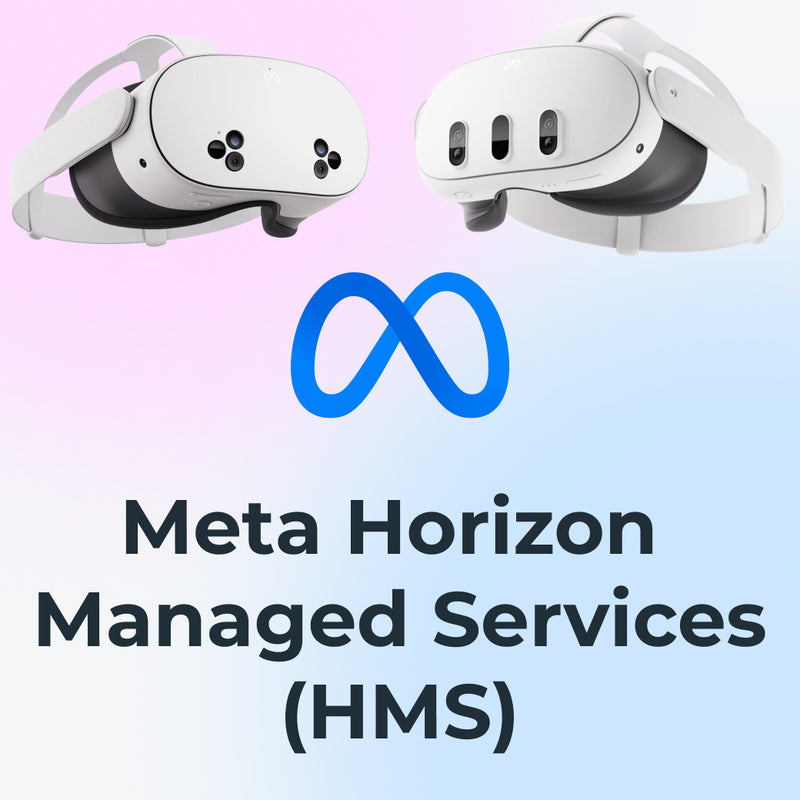
As of February 20, 2026, Meta Horizon Managed Services (HMS) is available at no cost. Long-term device provisioning, configuration, lifecycle management, and operational support remain critical for organizations deploying Meta Quest at scale.
This product reflects the real-world reality of enterprise and education XR deployments: while the HMS platform itself is free, organizations still need expert setup, device preparation, enrollment, policy configuration, and ongoing management to ensure their fleet remains usable, secure, and efficient through 2030 and beyond.
What This Product Represents
This listing is not just a software license. It represents a managed provisioning and device lifecycle service powered by Knoxlabs, built around Meta Horizon Managed Services.
We handle the operational complexity so your team doesn’t have to — from first unboxing to long-term management.
- Meta Quest 3
- Meta Quest 3S
Hardware is sold separately. HMS access is free, but correct deployment, enrollment, and management are not automatic.
Important: HMS (EDU or Work) must match your Meta Admin Center account type. Once a device is enrolled and activated, that assignment is permanent.
Why This Still Matters Now HMS Is Free
With HMS free, organizations still face challenges:
- Initial device enrollment and reseller linking
- Bulk provisioning and Shared Mode configuration
- Network, Wi-Fi, and security policy setup
- App deployment and content control
- Ongoing fleet changes, replacements, and resets
This product exists to cover those realities — and to give you access to Knoxlabs’ hands-on provisioning and device management expertise.
HMS for EDU vs. HMS for Work
| Feature | HMS for Work | HMS for EDU |
|---|---|---|
| Designed for | Enterprise, corporate, government | K-12, higher education, CTE, vocational training |
| Platform access | Included (free since Feb 20, 2026) | Included (free since Feb 20, 2026) |
| Shared Mode | Optional (with login) | No-login Shared Mode (classroom-ready) |
| Age support | 18+ | 13+ in Shared Mode |
| Compliance & privacy | SOC 2/3, ISO/IEC | SOC 2/3, ISO/IEC, FERPA-aligned |
| App Store behavior | Configurable | Restricted by default in Shared Mode |
What Knoxlabs Manages for You
-
Device Provisioning & Enrollment
Headsets are linked, enrolled, and prepared correctly before use — or even before shipping. -
App & Content Deployment
Approved apps are installed, blocked content is restricted, and environments are standardized. -
Security & Network Setup
Wi-Fi, certificates, PIN policies, OS update timing, and access rules are configured correctly. -
Shared Mode Configuration
Optimized setups for classrooms, labs, demos, and training environments. -
Remote Actions & Lifecycle Support
Resets, replacements, policy changes, and device transitions handled as your fleet evolves. -
MDM & Platform Compatibility
Works alongside ArborXR, ManageXR, Intune, Ivanti, and VMware when needed.
Activation & Reseller Linking
Meta still requires organizations to be linked to a reseller for provisioning and support.
Steps:
- Log in to the Meta Admin Center
- Go to Products & Billing
- Select Get activation code under Connect with a new reseller
- Send the code to hello@knoxlabs.com or paste it during checkout
This links your organization to Knoxlabs so we can provision, configure, and manage your devices.
If you’ve worked with Knoxlabs before, you can simply provide your Activation Code or Community ID.
After Your Order
- Your devices are linked using your Activation Code or Community ID
- Provisioning and configuration are applied
- Your Admin Center reflects the managed setup
- You receive confirmation once devices are ready
For pre-enrollment, kitting, labeling, or shipping-ready configurations, contact hello@knoxlabs.com.
FAQ
Is HMS really free?
Yes. Meta has made HMS platform access free. This product covers provisioning, setup, and management services.
Do devices still work without management?
Yes — but without provisioning and management, you lose centralized control, consistency, and operational efficiency.
Is this a software license?
No. This product represents managed services and operational support around HMS.
Can Knoxlabs manage large fleets?
Yes. We specialize in bulk deployments, renewals, replacements, and long-term fleet management.
Device management — education
ManageXR Management Software for Education | 1 Year License
Essential
Digital delivery timing confirmed separately
$ 74.45
Enterprise XR device management built to deploy, secure, and scale headset fleets.
ManageXR helps IT and XR program teams manage VR/AR deployments across multiple locations, departments, and use cases. From remote app distribution to kiosk mode and audit logs, ManageXR provides centralized control over devices, content, and the in-headset experience—so teams can move from pilots to scaled rollouts with less manual work.
What You Can Do with ManageXR
- Deploy apps and files remotely across your fleet
- Launch apps remotely for guided sessions and training workflows
- Lock devices into secure kiosk mode or a controlled multi-app home screen
- Configure security, sleep, and native system settings at scale
- Prevent tampering by blocking access to native menus and restricted settings
- Track device locations, status, and health signals
- Review user and device audit logs for visibility and compliance
- Customize user permissions and role-based access
- Provision WiFi networks and enterprise certificates
- Control firmware updates on supported platforms (device-dependent)
- Disable USB file transfer and developer mode where required
Plan Options
ManageXR is available in multiple plan tiers to match your deployment needs. Knoxlabs can help you select the right tier based on your security requirements, content types, and rollout size.
- Essential: Core device management + secure single-app kiosk + audit logs and policy controls
- Premium: Expanded content types + secure multi-app home screen + branding + analytics + API/SDK
- Enterprise: Advanced security + SSO + priority support + custom agreements and services
Customize the In-Headset Experience
- Secure single-app kiosk mode for focused workflows
- Secure multi-app home screen for curated access (plan-dependent)
- 3D home environment options (plan-dependent)
- Branding options (logos, colors, and more) (plan-dependent)
- Tutorial or intro app on launch to guide users (plan-dependent)
Deploy and Remotely Control XR Content
- Configure devices with content and settings
- Schedule content installs and updates
- Deploy apps, files, and supported media content types (plan-dependent)
- Deploy WebXR links (plan-dependent)
- App versioning, patching, and rollbacks
- Remote app launching for training sessions and guided use
- Remote playback controls for supported content (plan-dependent)
- Remote screen streaming for support and troubleshooting (plan-dependent)
Manage and Organize Devices
- Organize devices into groups for teams, locations, or use cases
- Device location, status, and health monitoring
- Dashboard to view, filter, search, and sort devices
- Usage analytics and charts (plan-dependent)
- Export and download usage data (plan-dependent)
Secure the Deployment
- Remote factory reset for recovery and redeployment
- Customizable user roles and permissions (plan-dependent)
- User and device audit logs (plan-dependent)
- Multi-factor authentication support
- Disable factory reset, developer mode, and USB file transfer where needed
- Hide user-identifying information on managed devices (plan-dependent)
- Web console single sign-on (SSO) (plan-dependent)
Control Device Settings
- Security, sleep, and native system settings
- User accessibility settings
- Language, time zone, and device controls (device-dependent)
- WiFi provisioning (WPA2, WPA2-Enterprise/802.1x, WPA3)
- Enterprise network certificates (User, CA)
- Firmware update controls on supported platforms (device-dependent)
Build on Top of ManageXR (API & SDK)
- Release channels and app sharing workflows (plan-dependent)
- Time and device limitations for app sharing (plan-dependent)
- CLI support for CI/CD pipelines (plan-dependent)
- ManageXR API (plan-dependent)
- Device SDK (plan-dependent)
- 3D Environment SDK (plan-dependent)
Support & Knoxlabs Implementation
- Global support access (tier-dependent)
- Volume options available for larger deployments
- Knoxlabs can provision headsets, enroll devices, and deliver kiosk-ready kits
- Optional services: staging, kitting, asset tagging, accessories, and fleet logistics
License Term
- License Duration: 1 Year
- Billing: Annual license term
- Unit: Per device license
$ 48.00
ArborXR Classroom — 1 Year License provides XR device management for schools, universities and qualifying nonprofits.
One unit licenses one device for one year on ArborXR Classroom. Order quantity is the number of device licenses. Education eligibility must be confirmed. Activation and renewal are coordinated with Knoxlabs; headsets, content licenses and provisioning services are separate.
Plan capabilities
- Organize headset settings and device groups in one management portal.
- Send approved apps, videos, files and web experiences to enrolled devices.
- Keep the headset experience focused with kiosk and launcher controls.
License and ordering
- Term: 1 year
- Unit: 1 device license
- Plan: Classroom
- SKU: S-MDM-ARBR-EDU-C
Before deployment
Confirm your exact headset model, operating system, network access and account owner before deployment. Feature availability can depend on the device. QR-code enrollment is not available for Meta devices. Use one plan tier across each ArborXR organization.
Knoxlabs can scope compatible headsets, enrollment, configuration and deployment services with your software licenses.
Your Configuration
Total
Quote required
One or more selected items need a quote. Your request will include every selected product and quantity.
Quote required for:Estimated dispatch
Estimated dispatch: 5–10 days
Dispatch estimates exclude carrier transit time. Timing is confirmed for your selected quantities.
Pricing on request
All sales are final across all brands. No customer-requested cancellations, returns, exchanges, or refunds, except where required by law or expressly agreed in writing. Manufacturer warranty claims go to the manufacturer; Knoxlabs can help with order details and support contacts.
- Software, hardware, and deployment support can be quoted together.
- Knoxlabs can help with configuration, integration, shipping and support.
Product details
Overview
A Meta Quest headset with a Knoxlabs two-year accidental protection package and carrying case. Current package eligibility and protection terms are confirmed by quote.
Package to confirm
- Meta Quest 3S 128GB or Meta Quest 3 512GB
- Knoxlabs two-year accidental protection plan, subject to the written coverage terms
- Protective hard carrying case
- Knoxlabs activation and basic setup guidance
Ordering and coverage
Request a current quote. The previous seasonal promotion is not presented as a current discount. Confirm protection provider, exclusions, claim procedure, shipping coverage and included accessories before ordering.
Meta Horizon managed services enrollment is now free. Meta has announced maintenance support through January 4, 2030. Historical two-year, three-year and lifetime labels identify legacy package SKUs; they do not promise indefinite service availability. Paid third-party MDM, provisioning, hardware warranty and accidental protection are separate package benefits. Confirm applicable legacy entitlements with Knoxlabs.
🛠
Deployment Expertise
Product specialists on staff
⚙
Device Configuration
Provisioned & ready to use
🎧
Enterprise Support
Hardware, software & deployment help
🌐
Global Fulfillment
Shipped worldwide
Need help with deployment?
Knoxlabs also handles the deployment.
Device setup
Integration planning
Asset tagging
Shipping coordination
Training and onboarding
Deployment consulting
