Skip to content

HoloDentist | Dental XR Communication & Simulation Platform

Request a quote
Overview

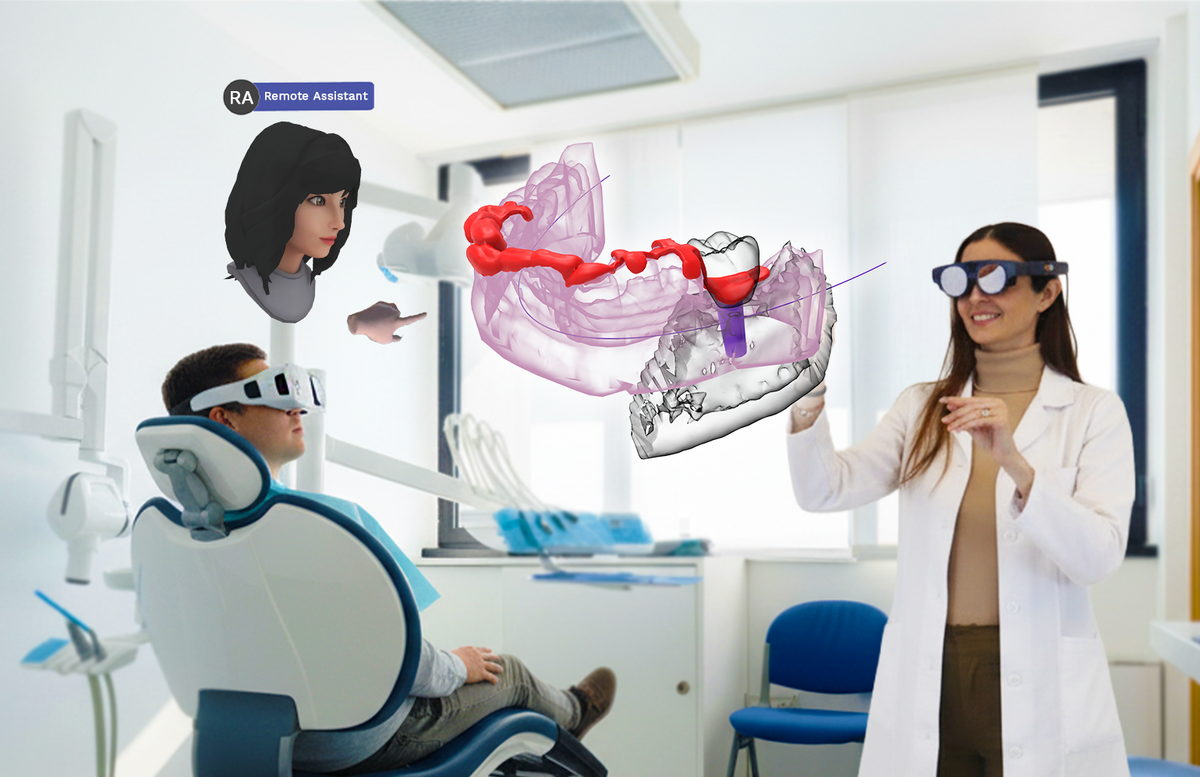
HoloDentist is an eXtended Reality (XR) application that brings dental practice into the next era of digital dentistry. By combining CBCT reconstructions, intra-oral scans, face scans, and CAD designs into a single live 3D environment, HoloDentist recreates the Virtual Patient — viewable as holograms by clinicians, patients, lab technicians, and trainees, together, in real time.

Built by FifthIngenium, HoloDentist has been featured on National Geographic and published in BMC Oral Health and the Journal of Prosthetic Dentistry (JPD).

What HoloDentist Solves

Traditional dental communication tools — flat 2D screens, paper printouts, plaster models — make it hard for patients to understand their treatment, and harder for clinics and labs to collaborate accurately. HoloDentist replaces all of that with a single 3D holographic workspace that everyone can see, touch, and discuss together — whether sitting next to each other or working remotely across cities.

Three Core Use Cases

1. Patient Discussion & Education Show patients their own CBCT, intra-oral scan, and proposed treatment plan as live 3D holograms. Patients see the before and after of their treatment with full clarity — increasing trust, treatment acceptance, and case closure rates.

2. Remote Collaboration with Lab Technicians Share detailed 3D models with the dental lab in real-time XR sessions. Discuss prosthesis specifications, margins, occlusion, and waxups with full spatial context — reducing errors and re-work, improving the quality of the final restoration.

3. Case Discussion, Training & Pre-Surgery Planning Display real cases to trainees and colleagues — same room or remote. Plan implant placement, surgical guides, and complex cases in 3D with AI-assisted tools before the patient is in the chair.

Key Features
  • Native XR app — runs on AR glasses, MR headsets, and VR devices with passthrough
  • 3D model support — works with .STL, .PLY, .OBJ, .JPG, .PNG and DICOM segmentation
  • Multi-source data ingest — CBCT, intra-oral scanners, face scanners, prosthetic/orthodontic/surgical CAD
  • Web-based data loading — drag and drop files from PC into the platform; no special hardware required on the desktop side
  • Real-time multi-user sessions — both participants in the same room, or one local + one remote
  • Voice commands and gesture recognition — keep both hands free during examination
  • Cross-device joining — second participant can connect via PC, tablet, smartphone, or a different XR headset
  • Compatible with ObiScanner — direct workflow integration with FifthIngenium's face scanner
  • Local and Remote modes — choose deployment based on clinic needs
Clinical Specialties Supported
  • Fixed & Removable Prosthodontics
  • Orthodontics
  • Radiology & Oral Pathology
  • Oral & Maxillofacial Surgery
  • Periodontal Surgery
  • Implant Dentistry & Guided Surgery
How It Works
  1. Load Data — Drag and drop CBCT, intra-oral scans, face scans, or CAD files into the HoloDentist desktop platform.
  2. Wear the Headset — Doctor puts on the XR headset and starts the session.
  3. Join the Session — Patient, lab technician, or colleague joins from a second XR device, PC, tablet, or smartphone.
  4. Discuss in 3D — Examine, rotate, annotate, and collaborate on the 3D model in real time.
Compatible Devices
  • Mixed Reality / Augmented Reality: HoloLens 2 · Magic Leap 2 · XREAL Light
  • VR with Passthrough: Meta Quest 3 · Meta Quest 3S · Meta Quest Pro · Pico 4 · HTC Vive · Apple Vision Pro
  • Pure VR: Meta Quest 2
  • Companion devices: PCs · Tablets · Smartphones